
You can reply to emails using Mozilla Thunderbird instead of using cPanel Webmail.
1. Open Mozilla Thunderbird.

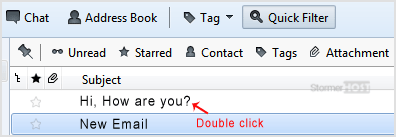
2. Click on the email you wish to open twice.
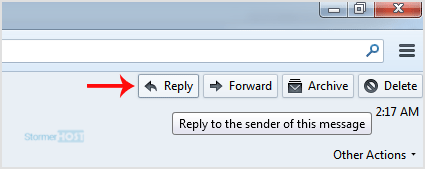
3. In the top-bottom area, click on the Reply button.
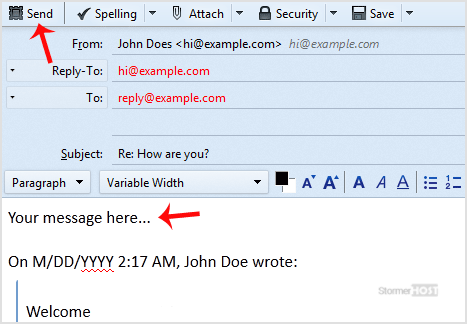
4. Type your message in a message box and click Send.
- Home
-
Store
- Domains Auction
- Browse All
- Linux Shared Hosting
- Windows Shared Hosting
- WordPress Hosting
- Linux Reseller Hosting
- Windows Reseller Hosting
- Linux Dedicated Servers -Unmanaged
- Cloud Hosting
- VPS Linux Hosting (USA)
- Google Workspace
- SSL Certificates
- CodeGuard
- SiteLock
- SSL Certificates
- Website Backup
- Website Security
- Professional Email
- VPN
- Register a New Domain
- Transfer Domains to Us
- Announcements
- Knowledgebase
- Network Status
- Affiliates
- Contact Us
-
More
