
If you want to remove email from Mozilla Thunderbird, you can easily do it, but if you use POP, the email will only be removed from your Thunderbird email client, and the email will be kept on your mail server.
If you use IMAP settings, then the email will be removed from both your Thunderbird Email Client and Main email server.
1. Open Mozilla Thunderbird.

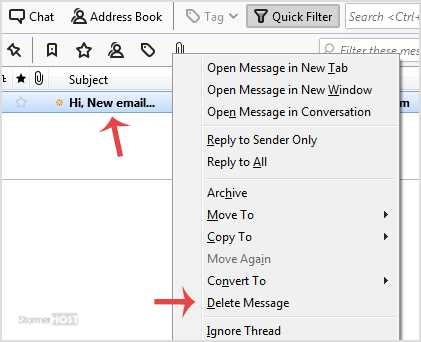
2. Open Inbox and right-click on the email you want to delete and then click on the Delete Message option.
- Home
-
Store
- Browse All
- Linux Shared Hosting
- Windows Shared Hosting
- WordPress Hosting
- Linux Reseller Hosting
- Windows Reseller Hosting
- Linux Dedicated Servers -Unmanaged
- Cloud Hosting
- VPS Linux Hosting (USA)
- Google Workspace
- SSL Certificates
- CodeGuard
- SiteLock
- SSL Certificates
- Website Backup
- Website Security
- Professional Email
- VPN
- Register a New Domain
- Transfer Domains to Us
- Announcements
- Knowledgebase
- Network Status
- Affiliates
- Contact Us
-
More