
Tudásbázis
How to Optimize a Database via phpMyAdmin in cPanel Kinyomtatja ezt a cikket
Optimizing your database in cPanel using phpMyAdmin boosts performance by freeing up unused space.
1. Log in to your cPanel account.
2. In the Databases section, click on phpMyAdmin.
3. Click on the Expand icon from the navigation tree in the left sidebar. 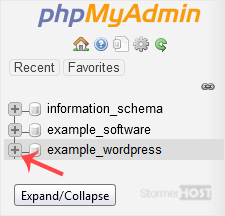
4. Scroll down and mark Check All. Click on the drop-down option and select Optimize tables.
The table has been successfully optimized.
Hasznosnak találta ezt a választ?
Kapcsolódó cikkek
How to Create a Database in cPanel
Creating a database in cPanel is quick and straightforward. Follow these steps to set up your...
Creating a database in cPanel is quick and straightforward. Follow these steps to set up your...
How to Rename a Database in cPanel
Creating a database in cPanel is quick and straightforward. Follow these steps to set up your...
Creating a database in cPanel is quick and straightforward. Follow these steps to set up your...
How to Create a Database Username in cPanel
A database username is important for connecting your website or application to the database. You...
A database username is important for connecting your website or application to the database. You...
How to Delete a Database in cPanel
You can delete a database in cPanel. Make sure to take a backup before deleting it because once...
You can delete a database in cPanel. Make sure to take a backup before deleting it because once...
How to Add a User to a Database and Grant Privileges
When managing a database in cPanel, it is important to add a user and set the right permissions...
When managing a database in cPanel, it is important to add a user and set the right permissions...
