
База знаний
How to Export Database Table via phpMyAdmin in cPanel Распечатать статью
Exporting a database table in cPanel using phpMyAdmin is a simple way to back up or transfer your data. It helps you maintain a backup of your database.
1. Log in to your cPanel account.
2. In the Databases section, click on phpMyAdmin.
3. From the navigation tree in the left sidebar. Please select an appropriate database that you want to export to your computer
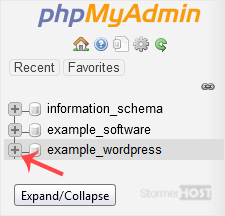
4. Click on Export.
5. Select SQL format and then click Export.
SQL file will be downloaded within a few seconds, depending on the size of the file.
Помог ли вам данный ответ?
Связанные статьи
How to Create a Database in cPanel
Creating a database in cPanel is quick and straightforward. Follow these steps to set up your...
Creating a database in cPanel is quick and straightforward. Follow these steps to set up your...
How to Rename a Database in cPanel
Creating a database in cPanel is quick and straightforward. Follow these steps to set up your...
Creating a database in cPanel is quick and straightforward. Follow these steps to set up your...
How to Create a Database Username in cPanel
A database username is important for connecting your website or application to the database. You...
A database username is important for connecting your website or application to the database. You...
How to Delete a Database in cPanel
You can delete a database in cPanel. Make sure to take a backup before deleting it because once...
You can delete a database in cPanel. Make sure to take a backup before deleting it because once...
How to Add a User to a Database and Grant Privileges
When managing a database in cPanel, it is important to add a user and set the right permissions...
When managing a database in cPanel, it is important to add a user and set the right permissions...
