
Knowledgebase
How to Repair a Database via phpMyAdmin in cPanel Print this Article
If your database has corrupted tables, repairing it through phpMyAdmin in cPanel can help fix issues with them.
1. Log in to your cPanel account.
2. In the Databases section, click on phpMyAdmin.
3. Click the Expand icon from the navigation tree in the left sidebar.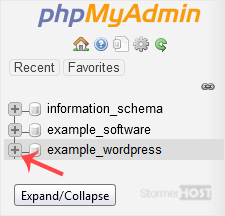
4. Scroll down and mark Check All. Then click on the drop-down arrow and select Repair table.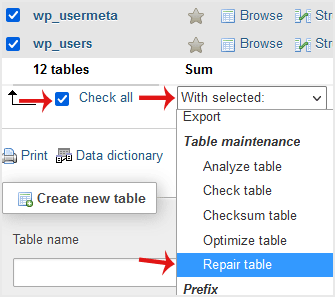
If the table has been repaired successfully, it will show an OK message. Otherwise, it will display an error on some tables.
Was this answer helpful?
Related Articles
How to Create a Database in cPanel
Creating a database in cPanel is quick and straightforward. Follow these steps to set up your...
Creating a database in cPanel is quick and straightforward. Follow these steps to set up your...
How to Rename a Database in cPanel
Creating a database in cPanel is quick and straightforward. Follow these steps to set up your...
Creating a database in cPanel is quick and straightforward. Follow these steps to set up your...
How to Create a Database Username in cPanel
A database username is important for connecting your website or application to the database. You...
A database username is important for connecting your website or application to the database. You...
How to Delete a Database in cPanel
You can delete a database in cPanel. Make sure to take a backup before deleting it because once...
You can delete a database in cPanel. Make sure to take a backup before deleting it because once...
How to Add a User to a Database and Grant Privileges
When managing a database in cPanel, it is important to add a user and set the right permissions...
When managing a database in cPanel, it is important to add a user and set the right permissions...
