
1. Log into your cPanel account.
2. In the Software section, click on the Softaculous Apps Installer Icon.

3. cPanel will open a Softaculous Interface.
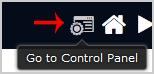
If you want to go back to cPanel, click on the cPanel icon.
- Home
-
Store
- Domains Auction
- Browse All
- Linux Shared Hosting
- Windows Shared Hosting
- WordPress Hosting
- Linux Reseller Hosting
- Windows Reseller Hosting
- Linux Dedicated Servers -Unmanaged
- Cloud Hosting
- VPS Linux Hosting (USA)
- Google Workspace
- SSL Certificates
- CodeGuard
- SiteLock
- SSL Certificates
- Website Backup
- Website Security
- Professional Email
- VPN
- Register a New Domain
- Transfer Domains to Us
- Announcements
- Knowledgebase
- Network Status
- Affiliates
- Contact Us
-
More
