
1. Log into your cPanel account.
2. In the Domains section, click on Subdomains Icon.

3. Under the Modify a Subdomain list you can see a list of subdomains.
4. Click the Manage Redirection link that corresponds to the subdomain that you wish to manage.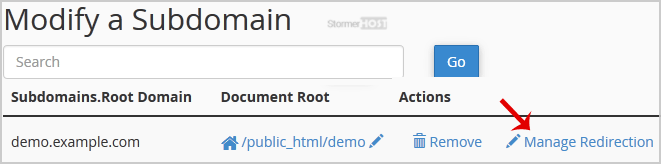
5. Under the Subdomain Redirection option, you should enter the link to which you want to redirect the subdomain in the available text box.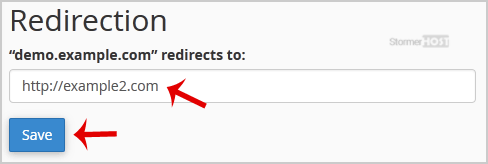
- Home
-
Store
- Browse All
- Linux Shared Hosting
- Windows Shared Hosting
- WordPress Hosting
- Linux Reseller Hosting
- Windows Reseller Hosting
- Linux Dedicated Servers -Unmanaged
- Cloud Hosting
- VPS Linux Hosting (USA)
- Google Workspace
- SSL Certificates
- CodeGuard
- SiteLock
- SSL Certificates
- Website Backup
- Website Security
- Professional Email
- VPN
- Register a New Domain
- Transfer Domains to Us
- Announcements
- Knowledgebase
- Network Status
- Affiliates
- Contact Us
-
More